
ChatGPT + Lovable Workflow: How Non-Coders Can Build Smarter Apps
- ramonanicole
- May 2
- 4 min read

For many people, AI starts as a content generator.
Need an email? Ask ChatGPT.
Need a summary? Ask ChatGPT.
Need a social post? Ask ChatGPT.
And while those use cases can absolutely be helpful, one of the biggest shifts in my own work has been realizing that AI can be far more powerful as a strategic planning partner—especially for no-code app building.
As someone without a traditional coding background, using a structured ChatGPT + Lovable workflow has fundamentally changed how I approach vibe coding.
Instead of jumping straight into build mode, I now use ChatGPT to help me think deeper before I spend Lovable credits, write prompts, or design features.
If you’re exploring AI workflow for non-coders, Lovable app development, or no-code app building with ChatGPT, this process can dramatically improve how you plan and build.
The Biggest Mistake Non-Coders Make in No-Code App Building

When many people first start building in platforms like Lovable, it’s tempting to immediately type:
“Build me an app that does X.”
Sometimes that works.
But often, it leads to:
Missing functionality
Weak backend planning
Security oversights
Inefficient workflows
Wasted Lovable credits
Multiple redesign cycles
The reality is simple:
Many non-coders don’t know what they don’t know yet.
That’s where ChatGPT becomes incredibly valuable—not just for writing prompts, but for uncovering the questions, blind spots, and technical considerations you may not think to ask on your own.
My ChatGPT + Lovable Workflow for Smarter App Building

Before I ask ChatGPT to generate a Lovable prompt, I start with my concept.
For example:
“I need an employee raffle progress tracker that pulls xAPI completion data from an LRS based on user email.”
At that point, I do not ask for a full build prompt yet.
Instead, I use one of the most effective phrases I’ve found:
“Don’t write the prompt yet. Ask me questions first.”
This single phrase shifts ChatGPT from content generator to strategic planning partner.
Instead of rushing to output, it starts helping me think through:
User identification
Data structure
Backend security
Edge cases
Query efficiency
Admin systems
Scale
For no-code builders, this is often where the biggest value happens.
Real-World Example: Building a Progress Tracker App with ChatGPT + Lovable

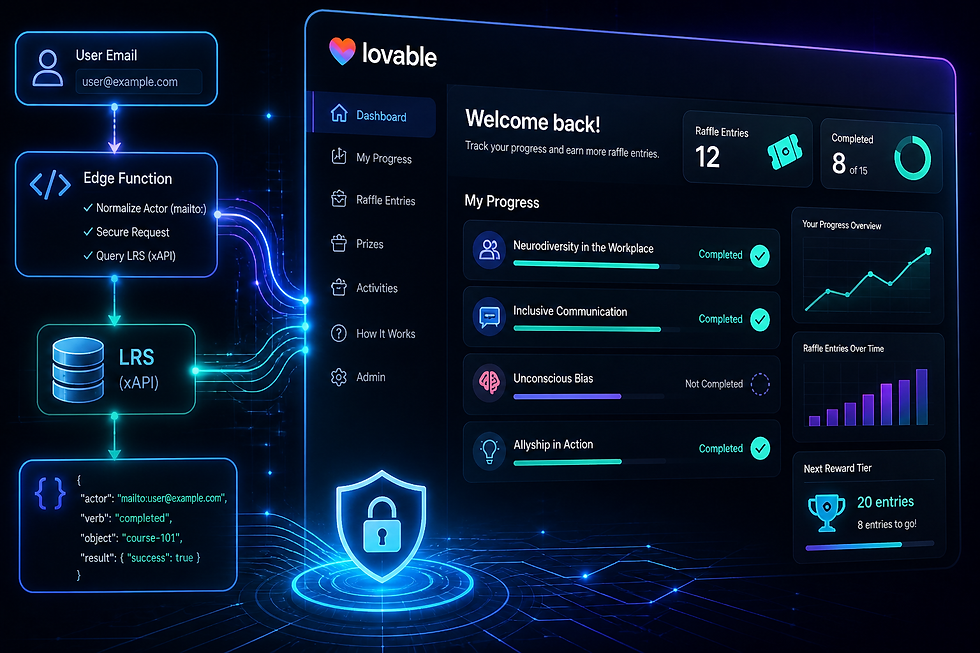
In one recent project, I built a progress tracker for a neurodiversity ERG raffle system.
The app needed to allow users to:
Enter their email
View completed learning interactions
Track and access remaining activities
Monitor raffle entries
View available prizes
At first glance, this seemed straightforward.
But planning with ChatGPT uncovered several technical considerations that would have been easy to miss.
Key Technical Considerations:
Actor normalization (mailto: formatting)
Case sensitivity
Multiple xAPI statements
No-result states
Secure API communication
Query optimization
Without strategic planning, I may have built something functional—but inefficient.
With planning, I built something significantly smarter.
Why ChatGPT Is Powerful for Non-Coders
As a non-coder, one of the biggest barriers to building apps isn’t necessarily design.
It’s systems thinking.
That includes:
Logic flow
Backend structure
Security
Scale
Data formatting
Performance
ChatGPT helps bridge that gap by improving how you think through projects before you build.
This doesn’t magically replace technical skill.
But it can dramatically improve your planning quality.
A Critical Lesson: Backend Security Matters

One major lesson from this Lovable project:
If your app is sending or receiving API data, those details should typically be handled securely in the backend—not exposed directly on the front end.
In Lovable, this often means using an Edge Function.
Why This Matters:
Protect API keys
Protect secrets
Secure endpoints
Normalize data
Improve scalability
This was one of the most practical examples of how ChatGPT helped me identify better architecture—not just better prompts.
Optimization: How Better Planning Saves Lovable Credits

One of the biggest practical advantages of this workflow is efficiency.
Example:
My initial test used only 3 objects.
My final build required around 15.
Without optimization:
15 user actions = 15 separate LRS queries
With optimization:
1 user query = All user data returned
That’s a major difference in:
Performance
Speed
Scalability
Another Lovable Credit-Saving Strategy:

If your project includes a large amount of repeatable content (like raffle prizes, tools, or resources), build an admin dashboard early.
This allows you to:
Add items manually
Edit content yourself
Avoid repeated prompt costs
Scale faster
For no-code builders, architecture decisions can save substantial time and money.
Why Iteration Beats One Perfect Prompt
One of the biggest misconceptions about prompt engineering is the idea that you need one flawless prompt from the start.
You don’t.
My process usually looks more like this:
My Build Process:
Phase 1: Plan strategically
Phase 2: Build MVP
Phase 3: Test
Phase 4: Return to ChatGPT for blind spots
Phase 5: Optimize
Phase 6: Expand
This iterative process consistently produces stronger results than trying to build everything at once.
The Real Power of AI Workflow for Non-Coders
The biggest value ChatGPT often provides isn’t immediate answers.
It’s better questions.
For me, this workflow has helped me:
Plan more strategically
Reduce blind spots
Improve technical decision-making
Save Lovable credits
Improve security
Build more scalable systems
That’s a huge shift.
It changes AI from:
“Do this for me.”
To:
“Help me think through this better.”
Final Takeaway: Use ChatGPT as a Cognitive Partner
For non-coders exploring ChatGPT + Lovable workflow, the biggest opportunity may not be faster building.
It may be smarter planning.
Before your next no-code or low-code project, try this:
“Here’s what I want to build. Don’t write the prompt yet. Ask me questions first.”
That one shift can improve:
Prompt quality
System design
Security
Efficiency
Final product quality
For me, ChatGPT works best not as a replacement for thinking—but as a cognitive partner that strengthens it.
Final Thoughts: Build Smarter Before You Build Faster
Use ChatGPT for:
Strategic planning
Prompt engineering
Systems thinking
Blind spot detection
Workflow optimization
Don’t limit ChatGPT to:
Writing emails
Surface-level prompts
Instant answers

Comments